
![NoWrithe [Deprecated]](https://img.gta5-mods.com/q75-w500-h333-cfill/images/nowrithe-scripthookv/bdfc34-NoWrithe.png "NoWrithe [Deprecated]")


64.843
553
64.843
553
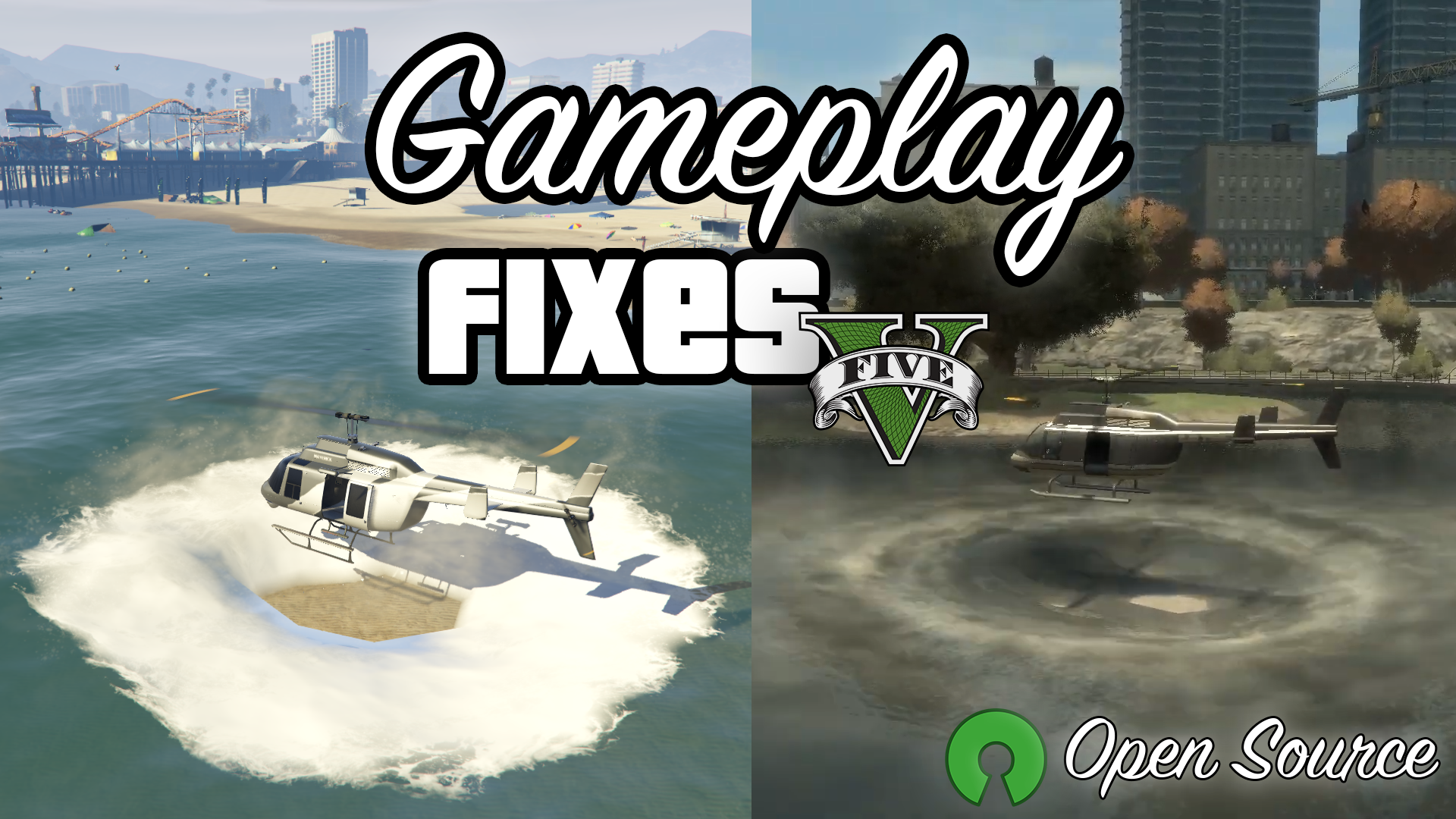
Open-source script that aims to address some of the numerous issues GTA:V has.
The advantages of using this mod are:
- It's compatible with both Legacy and Enhanced.
- It's tested on Legacy b1180 & b3521, Enhanced b812 & b1013.
- It's theoretically compatible with every game version since b335 (ScriptHook base).
- Functionalities are thoroughly tested, and blend-in with the game as if Rockstar implemented them.
- It's faster than its C#/.NET counterparts because it's written in CPP, with great attention at keeping it performant.
- It merges functionalities from many other mods, meaning that mods can now share resources (e.g., entity pools), making the code faster and allowing cross-compatibility between different options.
- Almost all functionality works out-of-the-box, without the need to patch the game's memory. Options that do so are clearly labelled, complexity is not hidden from the user.
- The lack of reliance on ScriptHookV .NET (which is essentially a fancy wrapper for normal ScriptHook) means less compatibility issues across game versions.
- It's open-source.
To my knowledge it's also the only mod that fixes the "Low Priority Props" bug in Enhanced and implements NM reactions without relying on ScriptHookV .NET.
Use the INI to configure it to your liking. I highly suggest you to read through all the options and decide which one to enable, with particular attention to the ones that could possibly cause issues with the game story (those which don't say anything have been tested and work fine with the story). All options can be enabled or disabled independently from one another.
Requires ScriptHookV
Installation: simply extract the ASI inside the game's root directory (where you have installed GTA:V, not inside the "scripts" folder).
Features
Input:
- Reload the INI config with F12 (key can be changed).
Memory:
- Skip intro and legal messages at the start of the game.
- Skip the landing page that defaults to Online mode on the Enhanced version.
- Allow low priority props to be spawned around the map.
- You must enable ExtendGamePools if using Enhanced.
- Disable the automatic centering of the wheels when a ped exits a vehicle. Applies to all vehicles (not only the player's).
- Disable cops from randomly changing the player's vehicle steering angle while ramming during a chase.
- Disable the slowdown and screen effects triggered by the weapon and the radio wheel.
Player:
- Enable the unused crouched motion state.
- Allow the player to grab onto nearby ledges when jumping. Useful for emulating parkour movement.
- Keep pressing the "Jump" button (space bar/'X' on controller) when in the air to automatically grab ledges that are in front of the player.
- Allow all ped models to use stealh and action mode.
- Disable action mode.
- Clean the player's wounds and dirt as he gradually enters the water and after picking up a medkit.
- Sprint inside interiors.
- Works in b1180 & later, but doesn't in b372. Don't know in between.
- Disable auto-vaulting small objects.
- Vaulting can still be performed manually by pressing the 'Jump' control near the objects.
- Disable automatic drop-down animations when near a ledge at high heights.
- Silent wanted (hide all HUD/music related to the wanted system).
Player Damage/Weapons:
- Enable friendly fire.
- Locational damage (e.g., armor won't protect your head, arms and lower body).
- Headshots can be made fatal for the player (just like NPCs).
- Configurable weapon recoil.
- Togglable inside vehicles.
- Separate recoil multipliers for weapon types (pistols, shotguns...) and addons (grips, silencers...).
- Player disarm (allow enemies that hit the player's weapon (or hands) to disarm the player, similar to RDR and GTA:IV).
- Definable custom 'drop chance' when hit.
- The weapon will retain all of its customizations (attachments, tints...).
- Weapon can be auto-equipped after being collected.
- When dropped, the weapon can be blipped on the minimap.
- Definable max distance after which a dropped weapon is despawned.
- Drop player weapon when ragdolling.
- Compatibility with custom NM reactions (read below).
- The weapon will retain all of its customizations (attachments, tints...).
- Weapon can be auto-equipped after being collected.
- When dropped, the weapon can be blipped on the minimap.
- Definable max distance after which a dropped weapon is despawned.
- Player Euphoria bullet reactions (the player will react to bullets with Euphoria like NPCs)
- Definable 'reaction chance' when hit.
- Definable minimum and maximum time for reaction.
- Togglable when in cover.
- Compatibility with other options that drop the player's weapon (so that the bullet reactions do not drop the player's weapon).
- Allow weapons inside the safehouse.
- Uses function hooks and could break upon updating.
Player Vehicle:
- Disable mid-air car controls and the ability to rotate the player's vehicle while stuck/upside down.
- Disable the automatic explosion after the player's vehicle collides with something at high speeds.
- Disable engine fire/smoke.
- Leave the engine on when exiting a vehicle unless the player keeps the exit vehicle button pressed for 250ms. Exactly like GTA:IV.
- Keeps the current position of the player vehicle's hydraulics on enter/exit.
- Requires at least b2372.
- Turn on brake lights while the player's vehicle is stopped.
- Helicopter water physics (allow helicopter's rotors to affect the movement of dynamic water bodies, similar to GTA:IV).
- Dynamically clean vehicles (clean dirt and decals (e.g., blood) from the vehicles near the player, including his, while raining).
- Depends on the amount of rain and the speed of the vehicle.
- Vehicles can also be cleaned by entering rivers or running along the seaside while partially in the water.
- Disable ragdolls on vehicle roof.
- Customizable max speed the vehicle the player is standing on before making the player enter ragdoll.
- Prevent other peds from dragging the player out of his vehicle.
- Prevent the player from flying through the windscreen.
- Prevent the player from falling off bikes.
- Disable the forced jump out when entering a water body with a bike (the player will still jump out if completely submerged).
- Disable vehicle jitter effect.
- Disable air vehicle turbulence.
- Disable auto-equip helmets.
- Togglable on bikes/helicopters.
- Disable all stunt jumps around the map
Player Controls:
- Disable assisted movement (when a player follows a path automatically while moving forward, eg. Floyd's apartment entrance).
- Quickly turn off the radio by tapping the radio control button ('Q'/left arrow on controller).
- Toggle walking for first person by pressing (and not holding) the sprint button (X on PS / A on XBOX).
- Disable auto-centering of the gameplay camera.
- Togglable on foot/in vehicle/always.
- Force the gameplay camera to follow the vehicle when using the handbrake
- Customizable handbrake delay before centering the camera on the vehicle.
- Disable First Person View.
- Disable the idle camera (it activates when the player stands still for too long).
- Disable the replay recording feature completely.
- Disable the player's mobile phone.
- Obviously brakes story missions.
HUD:
- Allow the game to continue when the pause menu is active, similar to GTA:Online.
- The game can still be paused by pressing the "ESC" key instead of the "P" key.
- Disable the blur and color filter on the pause menu.
- Disable all on-screen effects in menus and HUD (weapon wheel, radio wheel, character switch, etc.).
- Disable the on-screen effects when the player is using a special ability.
- Allow the player to switch between normal minimap size and extended, similar to GTA:Online.
- Enable a non-intrusive, Rockstar-like, speedometer on the minimap.
- Force a specified zoom level of the minimap.
- Flatten the minimap view.
- Reveal all the map (hide the "Fog Of War").
- Hide direction and distance indicator under the minimap when a waypoint is set.
- Hide the depth indicators under the minimap when inside a submersible.
- Hide the health, armour and ability bar under the minimap.
- Overrides all other 'minimap bars' options.
- Show remaining stamina instead of armour in the blue bar below the minimap.
- Hide specific HUD component(s).
- Hide the weapon reticle.
- Hide enemy's blips from the (mini)map. Also applies to police.
Audio:
- Disable the dynamic music that plays when wanted.
- Disable the police scanner voice that plays when wanted.
- The scanner still warks while in police vehicles.
- Disable the dynamic music that plays when flying.
- Disable all non-music radio content (ads, etc.).
- Disable vehicle's radio auto-start. Different modes available:
- Vehicles will start with the radio turned off by default, unless the engine is already running (e.g. when jacking a car).
- Radio will always be turned off when first entering a vehicle, regardless of engine state.
- Mute specific sound categories.
- Mute artificial ambient sounds (read INI for a deeper explanation).
- Disable player pain audio.
Peds:
- Dynamic car jacking reactions (allow peds to dynamically react to the player pointing a gun at their vehicle, just like in GTA:IV). Some will instantly flee, others will react and there's also a chance they'll still run you over.
- Shoot jacked peds (allow the player to kill the driver while jacking a vehicle with a handgun).
- Weapon jacking animations trigger only with non-customized weapons (e.g. silencers won't work).
- Allow the player to push (shove) peds out of his way, like in GTA:IV.
- Press the "Jump" button (space bar/'X' on controller) when standing in front of a ped to activate.
- Allow peds to use umbrellas during rainy weather.
- Definable max number of peds allowed to equip umbrellas.
- Disable all peds scenarios.
- Disable all dynamic population of the game world.
Peds Combat:
- Disable writhe state (block peds from entering the "writhe" state and consequently dying).
- Disable hurt state (block peds from entering the "hurt" state when shot while standing and consequently dying, or entering writhe).
- Disable shoot from ground (force peds to get up instead of shooting when they fall on the ground with their backs).
- Disable sitting peds instant death.
- Allow mission peds to be damaged by other entities and not only the player.
- Disable dead peds from jumping out of the vehicle they are in.
- Deadly NPCs headshots (headshots between NPCs will be deadly, just like when hit by the player).
- Ped disarm (allows the player to disarm peds when they are hit on the hand/weapon).
- Definable custom 'drop chance' when hit.
Peds Accuracy:
- Configurable ped accuracy. Modes available:
- Global: all peds will have the same accuracy.
- Random: peds will have random accuracy inside the custom-defined range.
- Clamp: ensure the default accuracy of a ped is inside the custom-defined range.
- Proportional: scale the ped's default accuracy value inside the the custom-defined range.
- More info inside the INI.
- Configurable ped shoot rate.
- The modes are the same for the option defined right above, excluding "Clamp" and "Proportional" modes.
- Global damage modifier for peds (both gun/melee weapons).
v3.3 - Changelog:
- Add DisableIntroScreens & DisableEnhancedLandingPage
- Improve NM reactions code to prevent game crashes
- Fix DefaultVehicleRadioOff not working correctly
- Improve EnableBrakeLightsOnStoppedVehicle
Changelog History
GitHub
Credits
If you find a bug leave a comment and I'll try to fix it, feedback is always appreciated.
Donating:
If you like what I do and are looking for a way to support me, you can do so on Ko-Fi or PayPal. Thank you!
The advantages of using this mod are:
- It's compatible with both Legacy and Enhanced.
- It's tested on Legacy b1180 & b3521, Enhanced b812 & b1013.
- It's theoretically compatible with every game version since b335 (ScriptHook base).
- Functionalities are thoroughly tested, and blend-in with the game as if Rockstar implemented them.
- It's faster than its C#/.NET counterparts because it's written in CPP, with great attention at keeping it performant.
- It merges functionalities from many other mods, meaning that mods can now share resources (e.g., entity pools), making the code faster and allowing cross-compatibility between different options.
- Almost all functionality works out-of-the-box, without the need to patch the game's memory. Options that do so are clearly labelled, complexity is not hidden from the user.
- The lack of reliance on ScriptHookV .NET (which is essentially a fancy wrapper for normal ScriptHook) means less compatibility issues across game versions.
- It's open-source.
To my knowledge it's also the only mod that fixes the "Low Priority Props" bug in Enhanced and implements NM reactions without relying on ScriptHookV .NET.
Use the INI to configure it to your liking. I highly suggest you to read through all the options and decide which one to enable, with particular attention to the ones that could possibly cause issues with the game story (those which don't say anything have been tested and work fine with the story). All options can be enabled or disabled independently from one another.
Requires ScriptHookV
Installation: simply extract the ASI inside the game's root directory (where you have installed GTA:V, not inside the "scripts" folder).
Features
Input:
- Reload the INI config with F12 (key can be changed).
Memory:
- Skip intro and legal messages at the start of the game.
- Skip the landing page that defaults to Online mode on the Enhanced version.
- Allow low priority props to be spawned around the map.
- You must enable ExtendGamePools if using Enhanced.
- Disable the automatic centering of the wheels when a ped exits a vehicle. Applies to all vehicles (not only the player's).
- Disable cops from randomly changing the player's vehicle steering angle while ramming during a chase.
- Disable the slowdown and screen effects triggered by the weapon and the radio wheel.
Player:
- Enable the unused crouched motion state.
- Allow the player to grab onto nearby ledges when jumping. Useful for emulating parkour movement.
- Keep pressing the "Jump" button (space bar/'X' on controller) when in the air to automatically grab ledges that are in front of the player.
- Allow all ped models to use stealh and action mode.
- Disable action mode.
- Clean the player's wounds and dirt as he gradually enters the water and after picking up a medkit.
- Sprint inside interiors.
- Works in b1180 & later, but doesn't in b372. Don't know in between.
- Disable auto-vaulting small objects.
- Vaulting can still be performed manually by pressing the 'Jump' control near the objects.
- Disable automatic drop-down animations when near a ledge at high heights.
- Silent wanted (hide all HUD/music related to the wanted system).
Player Damage/Weapons:
- Enable friendly fire.
- Locational damage (e.g., armor won't protect your head, arms and lower body).
- Headshots can be made fatal for the player (just like NPCs).
- Configurable weapon recoil.
- Togglable inside vehicles.
- Separate recoil multipliers for weapon types (pistols, shotguns...) and addons (grips, silencers...).
- Player disarm (allow enemies that hit the player's weapon (or hands) to disarm the player, similar to RDR and GTA:IV).
- Definable custom 'drop chance' when hit.
- The weapon will retain all of its customizations (attachments, tints...).
- Weapon can be auto-equipped after being collected.
- When dropped, the weapon can be blipped on the minimap.
- Definable max distance after which a dropped weapon is despawned.
- Drop player weapon when ragdolling.
- Compatibility with custom NM reactions (read below).
- The weapon will retain all of its customizations (attachments, tints...).
- Weapon can be auto-equipped after being collected.
- When dropped, the weapon can be blipped on the minimap.
- Definable max distance after which a dropped weapon is despawned.
- Player Euphoria bullet reactions (the player will react to bullets with Euphoria like NPCs)
- Definable 'reaction chance' when hit.
- Definable minimum and maximum time for reaction.
- Togglable when in cover.
- Compatibility with other options that drop the player's weapon (so that the bullet reactions do not drop the player's weapon).
- Allow weapons inside the safehouse.
- Uses function hooks and could break upon updating.
Player Vehicle:
- Disable mid-air car controls and the ability to rotate the player's vehicle while stuck/upside down.
- Disable the automatic explosion after the player's vehicle collides with something at high speeds.
- Disable engine fire/smoke.
- Leave the engine on when exiting a vehicle unless the player keeps the exit vehicle button pressed for 250ms. Exactly like GTA:IV.
- Keeps the current position of the player vehicle's hydraulics on enter/exit.
- Requires at least b2372.
- Turn on brake lights while the player's vehicle is stopped.
- Helicopter water physics (allow helicopter's rotors to affect the movement of dynamic water bodies, similar to GTA:IV).
- Dynamically clean vehicles (clean dirt and decals (e.g., blood) from the vehicles near the player, including his, while raining).
- Depends on the amount of rain and the speed of the vehicle.
- Vehicles can also be cleaned by entering rivers or running along the seaside while partially in the water.
- Disable ragdolls on vehicle roof.
- Customizable max speed the vehicle the player is standing on before making the player enter ragdoll.
- Prevent other peds from dragging the player out of his vehicle.
- Prevent the player from flying through the windscreen.
- Prevent the player from falling off bikes.
- Disable the forced jump out when entering a water body with a bike (the player will still jump out if completely submerged).
- Disable vehicle jitter effect.
- Disable air vehicle turbulence.
- Disable auto-equip helmets.
- Togglable on bikes/helicopters.
- Disable all stunt jumps around the map
Player Controls:
- Disable assisted movement (when a player follows a path automatically while moving forward, eg. Floyd's apartment entrance).
- Quickly turn off the radio by tapping the radio control button ('Q'/left arrow on controller).
- Toggle walking for first person by pressing (and not holding) the sprint button (X on PS / A on XBOX).
- Disable auto-centering of the gameplay camera.
- Togglable on foot/in vehicle/always.
- Force the gameplay camera to follow the vehicle when using the handbrake
- Customizable handbrake delay before centering the camera on the vehicle.
- Disable First Person View.
- Disable the idle camera (it activates when the player stands still for too long).
- Disable the replay recording feature completely.
- Disable the player's mobile phone.
- Obviously brakes story missions.
HUD:
- Allow the game to continue when the pause menu is active, similar to GTA:Online.
- The game can still be paused by pressing the "ESC" key instead of the "P" key.
- Disable the blur and color filter on the pause menu.
- Disable all on-screen effects in menus and HUD (weapon wheel, radio wheel, character switch, etc.).
- Disable the on-screen effects when the player is using a special ability.
- Allow the player to switch between normal minimap size and extended, similar to GTA:Online.
- Enable a non-intrusive, Rockstar-like, speedometer on the minimap.
- Force a specified zoom level of the minimap.
- Flatten the minimap view.
- Reveal all the map (hide the "Fog Of War").
- Hide direction and distance indicator under the minimap when a waypoint is set.
- Hide the depth indicators under the minimap when inside a submersible.
- Hide the health, armour and ability bar under the minimap.
- Overrides all other 'minimap bars' options.
- Show remaining stamina instead of armour in the blue bar below the minimap.
- Hide specific HUD component(s).
- Hide the weapon reticle.
- Hide enemy's blips from the (mini)map. Also applies to police.
Audio:
- Disable the dynamic music that plays when wanted.
- Disable the police scanner voice that plays when wanted.
- The scanner still warks while in police vehicles.
- Disable the dynamic music that plays when flying.
- Disable all non-music radio content (ads, etc.).
- Disable vehicle's radio auto-start. Different modes available:
- Vehicles will start with the radio turned off by default, unless the engine is already running (e.g. when jacking a car).
- Radio will always be turned off when first entering a vehicle, regardless of engine state.
- Mute specific sound categories.
- Mute artificial ambient sounds (read INI for a deeper explanation).
- Disable player pain audio.
Peds:
- Dynamic car jacking reactions (allow peds to dynamically react to the player pointing a gun at their vehicle, just like in GTA:IV). Some will instantly flee, others will react and there's also a chance they'll still run you over.
- Shoot jacked peds (allow the player to kill the driver while jacking a vehicle with a handgun).
- Weapon jacking animations trigger only with non-customized weapons (e.g. silencers won't work).
- Allow the player to push (shove) peds out of his way, like in GTA:IV.
- Press the "Jump" button (space bar/'X' on controller) when standing in front of a ped to activate.
- Allow peds to use umbrellas during rainy weather.
- Definable max number of peds allowed to equip umbrellas.
- Disable all peds scenarios.
- Disable all dynamic population of the game world.
Peds Combat:
- Disable writhe state (block peds from entering the "writhe" state and consequently dying).
- Disable hurt state (block peds from entering the "hurt" state when shot while standing and consequently dying, or entering writhe).
- Disable shoot from ground (force peds to get up instead of shooting when they fall on the ground with their backs).
- Disable sitting peds instant death.
- Allow mission peds to be damaged by other entities and not only the player.
- Disable dead peds from jumping out of the vehicle they are in.
- Deadly NPCs headshots (headshots between NPCs will be deadly, just like when hit by the player).
- Ped disarm (allows the player to disarm peds when they are hit on the hand/weapon).
- Definable custom 'drop chance' when hit.
Peds Accuracy:
- Configurable ped accuracy. Modes available:
- Global: all peds will have the same accuracy.
- Random: peds will have random accuracy inside the custom-defined range.
- Clamp: ensure the default accuracy of a ped is inside the custom-defined range.
- Proportional: scale the ped's default accuracy value inside the the custom-defined range.
- More info inside the INI.
- Configurable ped shoot rate.
- The modes are the same for the option defined right above, excluding "Clamp" and "Proportional" modes.
- Global damage modifier for peds (both gun/melee weapons).
v3.3 - Changelog:
- Add DisableIntroScreens & DisableEnhancedLandingPage
- Improve NM reactions code to prevent game crashes
- Fix DefaultVehicleRadioOff not working correctly
- Improve EnableBrakeLightsOnStoppedVehicle
Changelog History
GitHub
Credits
If you find a bug leave a comment and I'll try to fix it, feedback is always appreciated.
Donating:
If you like what I do and are looking for a way to support me, you can do so on Ko-Fi or PayPal. Thank you!
Primo Caricamento: 28 gennaio 2024
Ultimo Aggiornamento: 08 maggio 2026
Last Downloaded: 21 minuti fa
All Versions
435 Commenti
More mods by SuleMareVientu:
Open-source script that aims to address some of the numerous issues GTA:V has.
The advantages of using this mod are:
- It's compatible with both Legacy and Enhanced.
- It's tested on Legacy b1180 & b3521, Enhanced b812 & b1013.
- It's theoretically compatible with every game version since b335 (ScriptHook base).
- Functionalities are thoroughly tested, and blend-in with the game as if Rockstar implemented them.
- It's faster than its C#/.NET counterparts because it's written in CPP, with great attention at keeping it performant.
- It merges functionalities from many other mods, meaning that mods can now share resources (e.g., entity pools), making the code faster and allowing cross-compatibility between different options.
- Almost all functionality works out-of-the-box, without the need to patch the game's memory. Options that do so are clearly labelled, complexity is not hidden from the user.
- The lack of reliance on ScriptHookV .NET (which is essentially a fancy wrapper for normal ScriptHook) means less compatibility issues across game versions.
- It's open-source.
To my knowledge it's also the only mod that fixes the "Low Priority Props" bug in Enhanced and implements NM reactions without relying on ScriptHookV .NET.
Use the INI to configure it to your liking. I highly suggest you to read through all the options and decide which one to enable, with particular attention to the ones that could possibly cause issues with the game story (those which don't say anything have been tested and work fine with the story). All options can be enabled or disabled independently from one another.
Requires ScriptHookV
Installation: simply extract the ASI inside the game's root directory (where you have installed GTA:V, not inside the "scripts" folder).
Features
Input:
- Reload the INI config with F12 (key can be changed).
Memory:
- Skip intro and legal messages at the start of the game.
- Skip the landing page that defaults to Online mode on the Enhanced version.
- Allow low priority props to be spawned around the map.
- You must enable ExtendGamePools if using Enhanced.
- Disable the automatic centering of the wheels when a ped exits a vehicle. Applies to all vehicles (not only the player's).
- Disable cops from randomly changing the player's vehicle steering angle while ramming during a chase.
- Disable the slowdown and screen effects triggered by the weapon and the radio wheel.
Player:
- Enable the unused crouched motion state.
- Allow the player to grab onto nearby ledges when jumping. Useful for emulating parkour movement.
- Keep pressing the "Jump" button (space bar/'X' on controller) when in the air to automatically grab ledges that are in front of the player.
- Allow all ped models to use stealh and action mode.
- Disable action mode.
- Clean the player's wounds and dirt as he gradually enters the water and after picking up a medkit.
- Sprint inside interiors.
- Works in b1180 & later, but doesn't in b372. Don't know in between.
- Disable auto-vaulting small objects.
- Vaulting can still be performed manually by pressing the 'Jump' control near the objects.
- Disable automatic drop-down animations when near a ledge at high heights.
- Silent wanted (hide all HUD/music related to the wanted system).
Player Damage/Weapons:
- Enable friendly fire.
- Locational damage (e.g., armor won't protect your head, arms and lower body).
- Headshots can be made fatal for the player (just like NPCs).
- Configurable weapon recoil.
- Togglable inside vehicles.
- Separate recoil multipliers for weapon types (pistols, shotguns...) and addons (grips, silencers...).
- Player disarm (allow enemies that hit the player's weapon (or hands) to disarm the player, similar to RDR and GTA:IV).
- Definable custom 'drop chance' when hit.
- The weapon will retain all of its customizations (attachments, tints...).
- Weapon can be auto-equipped after being collected.
- When dropped, the weapon can be blipped on the minimap.
- Definable max distance after which a dropped weapon is despawned.
- Drop player weapon when ragdolling.
- Compatibility with custom NM reactions (read below).
- The weapon will retain all of its customizations (attachments, tints...).
- Weapon can be auto-equipped after being collected.
- When dropped, the weapon can be blipped on the minimap.
- Definable max distance after which a dropped weapon is despawned.
- Player Euphoria bullet reactions (the player will react to bullets with Euphoria like NPCs)
- Definable 'reaction chance' when hit.
- Definable minimum and maximum time for reaction.
- Togglable when in cover.
- Compatibility with other options that drop the player's weapon (so that the bullet reactions do not drop the player's weapon).
- Allow weapons inside the safehouse.
- Uses function hooks and could break upon updating.
Player Vehicle:
- Disable mid-air car controls and the ability to rotate the player's vehicle while stuck/upside down.
- Disable the automatic explosion after the player's vehicle collides with something at high speeds.
- Disable engine fire/smoke.
- Leave the engine on when exiting a vehicle unless the player keeps the exit vehicle button pressed for 250ms. Exactly like GTA:IV.
- Keeps the current position of the player vehicle's hydraulics on enter/exit.
- Requires at least b2372.
- Turn on brake lights while the player's vehicle is stopped.
- Helicopter water physics (allow helicopter's rotors to affect the movement of dynamic water bodies, similar to GTA:IV).
- Dynamically clean vehicles (clean dirt and decals (e.g., blood) from the vehicles near the player, including his, while raining).
- Depends on the amount of rain and the speed of the vehicle.
- Vehicles can also be cleaned by entering rivers or running along the seaside while partially in the water.
- Disable ragdolls on vehicle roof.
- Customizable max speed the vehicle the player is standing on before making the player enter ragdoll.
- Prevent other peds from dragging the player out of his vehicle.
- Prevent the player from flying through the windscreen.
- Prevent the player from falling off bikes.
- Disable the forced jump out when entering a water body with a bike (the player will still jump out if completely submerged).
- Disable vehicle jitter effect.
- Disable air vehicle turbulence.
- Disable auto-equip helmets.
- Togglable on bikes/helicopters.
- Disable all stunt jumps around the map
Player Controls:
- Disable assisted movement (when a player follows a path automatically while moving forward, eg. Floyd's apartment entrance).
- Quickly turn off the radio by tapping the radio control button ('Q'/left arrow on controller).
- Toggle walking for first person by pressing (and not holding) the sprint button (X on PS / A on XBOX).
- Disable auto-centering of the gameplay camera.
- Togglable on foot/in vehicle/always.
- Force the gameplay camera to follow the vehicle when using the handbrake
- Customizable handbrake delay before centering the camera on the vehicle.
- Disable First Person View.
- Disable the idle camera (it activates when the player stands still for too long).
- Disable the replay recording feature completely.
- Disable the player's mobile phone.
- Obviously brakes story missions.
HUD:
- Allow the game to continue when the pause menu is active, similar to GTA:Online.
- The game can still be paused by pressing the "ESC" key instead of the "P" key.
- Disable the blur and color filter on the pause menu.
- Disable all on-screen effects in menus and HUD (weapon wheel, radio wheel, character switch, etc.).
- Disable the on-screen effects when the player is using a special ability.
- Allow the player to switch between normal minimap size and extended, similar to GTA:Online.
- Enable a non-intrusive, Rockstar-like, speedometer on the minimap.
- Force a specified zoom level of the minimap.
- Flatten the minimap view.
- Reveal all the map (hide the "Fog Of War").
- Hide direction and distance indicator under the minimap when a waypoint is set.
- Hide the depth indicators under the minimap when inside a submersible.
- Hide the health, armour and ability bar under the minimap.
- Overrides all other 'minimap bars' options.
- Show remaining stamina instead of armour in the blue bar below the minimap.
- Hide specific HUD component(s).
- Hide the weapon reticle.
- Hide enemy's blips from the (mini)map. Also applies to police.
Audio:
- Disable the dynamic music that plays when wanted.
- Disable the police scanner voice that plays when wanted.
- The scanner still warks while in police vehicles.
- Disable the dynamic music that plays when flying.
- Disable all non-music radio content (ads, etc.).
- Disable vehicle's radio auto-start. Different modes available:
- Vehicles will start with the radio turned off by default, unless the engine is already running (e.g. when jacking a car).
- Radio will always be turned off when first entering a vehicle, regardless of engine state.
- Mute specific sound categories.
- Mute artificial ambient sounds (read INI for a deeper explanation).
- Disable player pain audio.
Peds:
- Dynamic car jacking reactions (allow peds to dynamically react to the player pointing a gun at their vehicle, just like in GTA:IV). Some will instantly flee, others will react and there's also a chance they'll still run you over.
- Shoot jacked peds (allow the player to kill the driver while jacking a vehicle with a handgun).
- Weapon jacking animations trigger only with non-customized weapons (e.g. silencers won't work).
- Allow the player to push (shove) peds out of his way, like in GTA:IV.
- Press the "Jump" button (space bar/'X' on controller) when standing in front of a ped to activate.
- Allow peds to use umbrellas during rainy weather.
- Definable max number of peds allowed to equip umbrellas.
- Disable all peds scenarios.
- Disable all dynamic population of the game world.
Peds Combat:
- Disable writhe state (block peds from entering the "writhe" state and consequently dying).
- Disable hurt state (block peds from entering the "hurt" state when shot while standing and consequently dying, or entering writhe).
- Disable shoot from ground (force peds to get up instead of shooting when they fall on the ground with their backs).
- Disable sitting peds instant death.
- Allow mission peds to be damaged by other entities and not only the player.
- Disable dead peds from jumping out of the vehicle they are in.
- Deadly NPCs headshots (headshots between NPCs will be deadly, just like when hit by the player).
- Ped disarm (allows the player to disarm peds when they are hit on the hand/weapon).
- Definable custom 'drop chance' when hit.
Peds Accuracy:
- Configurable ped accuracy. Modes available:
- Global: all peds will have the same accuracy.
- Random: peds will have random accuracy inside the custom-defined range.
- Clamp: ensure the default accuracy of a ped is inside the custom-defined range.
- Proportional: scale the ped's default accuracy value inside the the custom-defined range.
- More info inside the INI.
- Configurable ped shoot rate.
- The modes are the same for the option defined right above, excluding "Clamp" and "Proportional" modes.
- Global damage modifier for peds (both gun/melee weapons).
v3.3 - Changelog:
- Add DisableIntroScreens & DisableEnhancedLandingPage
- Improve NM reactions code to prevent game crashes
- Fix DefaultVehicleRadioOff not working correctly
- Improve EnableBrakeLightsOnStoppedVehicle
Changelog History
GitHub
Credits
If you find a bug leave a comment and I'll try to fix it, feedback is always appreciated.
Donating:
If you like what I do and are looking for a way to support me, you can do so on Ko-Fi or PayPal. Thank you!
The advantages of using this mod are:
- It's compatible with both Legacy and Enhanced.
- It's tested on Legacy b1180 & b3521, Enhanced b812 & b1013.
- It's theoretically compatible with every game version since b335 (ScriptHook base).
- Functionalities are thoroughly tested, and blend-in with the game as if Rockstar implemented them.
- It's faster than its C#/.NET counterparts because it's written in CPP, with great attention at keeping it performant.
- It merges functionalities from many other mods, meaning that mods can now share resources (e.g., entity pools), making the code faster and allowing cross-compatibility between different options.
- Almost all functionality works out-of-the-box, without the need to patch the game's memory. Options that do so are clearly labelled, complexity is not hidden from the user.
- The lack of reliance on ScriptHookV .NET (which is essentially a fancy wrapper for normal ScriptHook) means less compatibility issues across game versions.
- It's open-source.
To my knowledge it's also the only mod that fixes the "Low Priority Props" bug in Enhanced and implements NM reactions without relying on ScriptHookV .NET.
Use the INI to configure it to your liking. I highly suggest you to read through all the options and decide which one to enable, with particular attention to the ones that could possibly cause issues with the game story (those which don't say anything have been tested and work fine with the story). All options can be enabled or disabled independently from one another.
Requires ScriptHookV
Installation: simply extract the ASI inside the game's root directory (where you have installed GTA:V, not inside the "scripts" folder).
Features
Input:
- Reload the INI config with F12 (key can be changed).
Memory:
- Skip intro and legal messages at the start of the game.
- Skip the landing page that defaults to Online mode on the Enhanced version.
- Allow low priority props to be spawned around the map.
- You must enable ExtendGamePools if using Enhanced.
- Disable the automatic centering of the wheels when a ped exits a vehicle. Applies to all vehicles (not only the player's).
- Disable cops from randomly changing the player's vehicle steering angle while ramming during a chase.
- Disable the slowdown and screen effects triggered by the weapon and the radio wheel.
Player:
- Enable the unused crouched motion state.
- Allow the player to grab onto nearby ledges when jumping. Useful for emulating parkour movement.
- Keep pressing the "Jump" button (space bar/'X' on controller) when in the air to automatically grab ledges that are in front of the player.
- Allow all ped models to use stealh and action mode.
- Disable action mode.
- Clean the player's wounds and dirt as he gradually enters the water and after picking up a medkit.
- Sprint inside interiors.
- Works in b1180 & later, but doesn't in b372. Don't know in between.
- Disable auto-vaulting small objects.
- Vaulting can still be performed manually by pressing the 'Jump' control near the objects.
- Disable automatic drop-down animations when near a ledge at high heights.
- Silent wanted (hide all HUD/music related to the wanted system).
Player Damage/Weapons:
- Enable friendly fire.
- Locational damage (e.g., armor won't protect your head, arms and lower body).
- Headshots can be made fatal for the player (just like NPCs).
- Configurable weapon recoil.
- Togglable inside vehicles.
- Separate recoil multipliers for weapon types (pistols, shotguns...) and addons (grips, silencers...).
- Player disarm (allow enemies that hit the player's weapon (or hands) to disarm the player, similar to RDR and GTA:IV).
- Definable custom 'drop chance' when hit.
- The weapon will retain all of its customizations (attachments, tints...).
- Weapon can be auto-equipped after being collected.
- When dropped, the weapon can be blipped on the minimap.
- Definable max distance after which a dropped weapon is despawned.
- Drop player weapon when ragdolling.
- Compatibility with custom NM reactions (read below).
- The weapon will retain all of its customizations (attachments, tints...).
- Weapon can be auto-equipped after being collected.
- When dropped, the weapon can be blipped on the minimap.
- Definable max distance after which a dropped weapon is despawned.
- Player Euphoria bullet reactions (the player will react to bullets with Euphoria like NPCs)
- Definable 'reaction chance' when hit.
- Definable minimum and maximum time for reaction.
- Togglable when in cover.
- Compatibility with other options that drop the player's weapon (so that the bullet reactions do not drop the player's weapon).
- Allow weapons inside the safehouse.
- Uses function hooks and could break upon updating.
Player Vehicle:
- Disable mid-air car controls and the ability to rotate the player's vehicle while stuck/upside down.
- Disable the automatic explosion after the player's vehicle collides with something at high speeds.
- Disable engine fire/smoke.
- Leave the engine on when exiting a vehicle unless the player keeps the exit vehicle button pressed for 250ms. Exactly like GTA:IV.
- Keeps the current position of the player vehicle's hydraulics on enter/exit.
- Requires at least b2372.
- Turn on brake lights while the player's vehicle is stopped.
- Helicopter water physics (allow helicopter's rotors to affect the movement of dynamic water bodies, similar to GTA:IV).
- Dynamically clean vehicles (clean dirt and decals (e.g., blood) from the vehicles near the player, including his, while raining).
- Depends on the amount of rain and the speed of the vehicle.
- Vehicles can also be cleaned by entering rivers or running along the seaside while partially in the water.
- Disable ragdolls on vehicle roof.
- Customizable max speed the vehicle the player is standing on before making the player enter ragdoll.
- Prevent other peds from dragging the player out of his vehicle.
- Prevent the player from flying through the windscreen.
- Prevent the player from falling off bikes.
- Disable the forced jump out when entering a water body with a bike (the player will still jump out if completely submerged).
- Disable vehicle jitter effect.
- Disable air vehicle turbulence.
- Disable auto-equip helmets.
- Togglable on bikes/helicopters.
- Disable all stunt jumps around the map
Player Controls:
- Disable assisted movement (when a player follows a path automatically while moving forward, eg. Floyd's apartment entrance).
- Quickly turn off the radio by tapping the radio control button ('Q'/left arrow on controller).
- Toggle walking for first person by pressing (and not holding) the sprint button (X on PS / A on XBOX).
- Disable auto-centering of the gameplay camera.
- Togglable on foot/in vehicle/always.
- Force the gameplay camera to follow the vehicle when using the handbrake
- Customizable handbrake delay before centering the camera on the vehicle.
- Disable First Person View.
- Disable the idle camera (it activates when the player stands still for too long).
- Disable the replay recording feature completely.
- Disable the player's mobile phone.
- Obviously brakes story missions.
HUD:
- Allow the game to continue when the pause menu is active, similar to GTA:Online.
- The game can still be paused by pressing the "ESC" key instead of the "P" key.
- Disable the blur and color filter on the pause menu.
- Disable all on-screen effects in menus and HUD (weapon wheel, radio wheel, character switch, etc.).
- Disable the on-screen effects when the player is using a special ability.
- Allow the player to switch between normal minimap size and extended, similar to GTA:Online.
- Enable a non-intrusive, Rockstar-like, speedometer on the minimap.
- Force a specified zoom level of the minimap.
- Flatten the minimap view.
- Reveal all the map (hide the "Fog Of War").
- Hide direction and distance indicator under the minimap when a waypoint is set.
- Hide the depth indicators under the minimap when inside a submersible.
- Hide the health, armour and ability bar under the minimap.
- Overrides all other 'minimap bars' options.
- Show remaining stamina instead of armour in the blue bar below the minimap.
- Hide specific HUD component(s).
- Hide the weapon reticle.
- Hide enemy's blips from the (mini)map. Also applies to police.
Audio:
- Disable the dynamic music that plays when wanted.
- Disable the police scanner voice that plays when wanted.
- The scanner still warks while in police vehicles.
- Disable the dynamic music that plays when flying.
- Disable all non-music radio content (ads, etc.).
- Disable vehicle's radio auto-start. Different modes available:
- Vehicles will start with the radio turned off by default, unless the engine is already running (e.g. when jacking a car).
- Radio will always be turned off when first entering a vehicle, regardless of engine state.
- Mute specific sound categories.
- Mute artificial ambient sounds (read INI for a deeper explanation).
- Disable player pain audio.
Peds:
- Dynamic car jacking reactions (allow peds to dynamically react to the player pointing a gun at their vehicle, just like in GTA:IV). Some will instantly flee, others will react and there's also a chance they'll still run you over.
- Shoot jacked peds (allow the player to kill the driver while jacking a vehicle with a handgun).
- Weapon jacking animations trigger only with non-customized weapons (e.g. silencers won't work).
- Allow the player to push (shove) peds out of his way, like in GTA:IV.
- Press the "Jump" button (space bar/'X' on controller) when standing in front of a ped to activate.
- Allow peds to use umbrellas during rainy weather.
- Definable max number of peds allowed to equip umbrellas.
- Disable all peds scenarios.
- Disable all dynamic population of the game world.
Peds Combat:
- Disable writhe state (block peds from entering the "writhe" state and consequently dying).
- Disable hurt state (block peds from entering the "hurt" state when shot while standing and consequently dying, or entering writhe).
- Disable shoot from ground (force peds to get up instead of shooting when they fall on the ground with their backs).
- Disable sitting peds instant death.
- Allow mission peds to be damaged by other entities and not only the player.
- Disable dead peds from jumping out of the vehicle they are in.
- Deadly NPCs headshots (headshots between NPCs will be deadly, just like when hit by the player).
- Ped disarm (allows the player to disarm peds when they are hit on the hand/weapon).
- Definable custom 'drop chance' when hit.
Peds Accuracy:
- Configurable ped accuracy. Modes available:
- Global: all peds will have the same accuracy.
- Random: peds will have random accuracy inside the custom-defined range.
- Clamp: ensure the default accuracy of a ped is inside the custom-defined range.
- Proportional: scale the ped's default accuracy value inside the the custom-defined range.
- More info inside the INI.
- Configurable ped shoot rate.
- The modes are the same for the option defined right above, excluding "Clamp" and "Proportional" modes.
- Global damage modifier for peds (both gun/melee weapons).
v3.3 - Changelog:
- Add DisableIntroScreens & DisableEnhancedLandingPage
- Improve NM reactions code to prevent game crashes
- Fix DefaultVehicleRadioOff not working correctly
- Improve EnableBrakeLightsOnStoppedVehicle
Changelog History
GitHub
Credits
If you find a bug leave a comment and I'll try to fix it, feedback is always appreciated.
Donating:
If you like what I do and are looking for a way to support me, you can do so on Ko-Fi or PayPal. Thank you!
Primo Caricamento: 28 gennaio 2024
Ultimo Aggiornamento: 08 maggio 2026
Last Downloaded: 21 minuti fa
 5mods on Discord

@Dissociated
Disable intro and legal messages patches. Also disable landing page patch
@SuleMareVientu is this in the config? or is this something i do not associated with this MOD before installing it?
@SuleMareVientu so i found in config file, tried it, it looked like it was gonna work, but then while loading in it kept crashing. Not sure if theres another way. If not thats ok, but your mod is amazing
crash after 15 minutes please fix [22:41:12] CORE: An exception occurred while executing 'GameplayFixesV.asi', id 5
Exception addr 0x00007FF70C4F1E6C is GTA5_Enhanced.exe+0x00151E6C
Last called native 0x0000000000000000
didn hapen before recnet hotfix
Ped disarm seem to not work on enhanced latest version, even when chances are set to 100%
@SuleMareVientu If possible, could you add a toggle for the player to regen at full health after taking damage with the ability to modify regen rate?
Hey SuleMareVientu, huge fan of GameplayFixesV — it's one of the best maintained ASI mods for GTA V Legacy.
I've been trying to build a custom ASI that enables reflections for dynamic props like traffic lights and street lights (similar to what ZPatchV's HighQualityReflections did) but without touching the shader/alpha pipeline — to stay compatible with Larcius's Vegetation Reflection mod which uses a custom DXBC shader for leaf transparency.
The problem is ZPatchV is abandoned since 2022 and doesn't support version 3751, and its HighQualityReflections feature handles vegetation alpha very poorly anyway (no leaves, just branches).
I already have a working ASI skeleton that compiles and loads into GTA V (version 1.0.3751.0) using Visual Studio 2022. The only thing I'm stuck on is finding the memory pattern that controls what gets included in the cubemap/reflection render pass for dynamic props.
Given that you've already done memory patching for GTA V with cross-version pattern scanning (LowPriorityPropsPatch etc.), I wanted to ask — do you have any idea what pattern/signature controls dynamic prop inclusion in the reflection cubemap pass? Or would you ever consider adding something like this to GameplayFixesV?
Any help would be massively appreciated, thanks for everything you do for the community.
"[14:09:39] CORE: An exception occurred while executing 'GameplayFixesV.asi', id 107
Exception addr 0x00007FFA2ECF8CF0 is clr.dll+0x005F8CF0
Last called native 0x0000000000000000" occured while in a police chase and jumping out of the car, causing my character to ragdoll and drop my weapon thanks to this mod, but the game suddenly froze and crashed.
I have 6 other script mods, and 2 other asi's, and weapon replacer mods, so it may or may not be a conflict.
adds everything you could ever ask for. 10/10
@SuleMareVientu , 3.3 Version just Perfect , Bro :o
But Can You add some fixes from old ZPatchV by Zolika ? I want to add increase static shadow distance ...
; remove the draw distance from static vehicle shadows
InfiniteCarBottomDistance=1
or this :
; make everything reflect the entire world except vehicles and peds, performance hit and might be unstable at times
HighQualityReflections=1
It`s very cool too ...
happy to report that the green square issue I was having on the HUD has since been fixed, im happy to be able to use this mod
could I request a feature tho? if possible, to restore the old gen behavior of the Wasted screen, which allowed for there to be a 1 second delay after dying and before the wasted screen that allowed the player to see their death play out briefly
could you possibly make an update to the mod where traffic npcs wont get out theyre cars and shoot because you discharged your gun please 🙏 it'll go perfectly with lspdfr aswell.
good, but the fatal headshot feature is very annoying when it comes to replaying the story and michael, franklin and trevor just die randomly. im glad you made it editable tho :)
This loves breaking storymode missions no joke
causes mission to fail (mission/trevor/franklin dies as soon shootout starts). if that happens. just drag out from folder then redrag once done with missions. i still couldnt find which line caused it. i already had friendlyfire off, location damage off, mission entity damage off and still occurs. probably accuracy/recoil? i altered it. will have to investigate more. good mod nontheless.
@Aderlane LIKE ANY OTHER SCRIPTS OMG
Hi. I found a bug. Some gang members, specifically those I noticed this effect on (Ballas, Marabunta - with blue clothes), are affected. A headshot is registered as a body shot, and a fatal headshot doesn't occur. I moved the mod to the disabled scripts folder, and everything is fine now.
@Quickingasscat only on this script though, all of the other scripts except this like breaking storymode missions.
Is it recommended to use custom gameconfig, heapadjuster or packfilelimit? It says that we should enable extendgamepools enabled if you want to enable low priority props, when custom gameconfigs mostly already do that
@SuleMareVientu is there a way to NOT turn cars on by default? a manual engine toggle perhaps?