3DWeaponUI 1.0








220
8
220
8
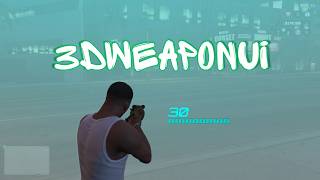
This mod adds a 3D ammo display in GTA V that shows your current ammo and a progress bar floating in front of the camera. It feels smooth, customizable, and remembers your settings.
Features:
- Shows ammo in 3D with smooth movement and fades in/out when you aim.
- You can change colors, size, spacing, and position from an in-game menu.
- Settings are saved in an INI file and automatically loaded every time.
- Includes a segmented progress bar that turns red when ammo is low.
- Open and control the menu using the in-game phone (iFruit).
Requirements:
- Scripthookdotnet Nightly 118
- NativeUI
- Ifruitaddon2
Installation:
1. Place the 3DWeaponUI.dll and 3DWeaponUI.ini files provided in the download inside your scripts folder.
2. Put 3DWeaponUI.ytd into this path '\mods\update\update.rpf\x64\textures\script_txds.rpf'
3. Start your game.
Features:
- Shows ammo in 3D with smooth movement and fades in/out when you aim.
- You can change colors, size, spacing, and position from an in-game menu.
- Settings are saved in an INI file and automatically loaded every time.
- Includes a segmented progress bar that turns red when ammo is low.
- Open and control the menu using the in-game phone (iFruit).
Requirements:
- Scripthookdotnet Nightly 118
- NativeUI
- Ifruitaddon2
Installation:
1. Place the 3DWeaponUI.dll and 3DWeaponUI.ini files provided in the download inside your scripts folder.
2. Put 3DWeaponUI.ytd into this path '\mods\update\update.rpf\x64\textures\script_txds.rpf'
3. Start your game.
Primo Caricamento: 23 aprile 2026
Ultimo Aggiornamento: 23 aprile 2026
Last Downloaded: 21 hours ago
7 Commenti
More mods by MNHC:
This mod adds a 3D ammo display in GTA V that shows your current ammo and a progress bar floating in front of the camera. It feels smooth, customizable, and remembers your settings.
Features:
- Shows ammo in 3D with smooth movement and fades in/out when you aim.
- You can change colors, size, spacing, and position from an in-game menu.
- Settings are saved in an INI file and automatically loaded every time.
- Includes a segmented progress bar that turns red when ammo is low.
- Open and control the menu using the in-game phone (iFruit).
Requirements:
- Scripthookdotnet Nightly 118
- NativeUI
- Ifruitaddon2
Installation:
1. Place the 3DWeaponUI.dll and 3DWeaponUI.ini files provided in the download inside your scripts folder.
2. Put 3DWeaponUI.ytd into this path '\mods\update\update.rpf\x64\textures\script_txds.rpf'
3. Start your game.
Features:
- Shows ammo in 3D with smooth movement and fades in/out when you aim.
- You can change colors, size, spacing, and position from an in-game menu.
- Settings are saved in an INI file and automatically loaded every time.
- Includes a segmented progress bar that turns red when ammo is low.
- Open and control the menu using the in-game phone (iFruit).
Requirements:
- Scripthookdotnet Nightly 118
- NativeUI
- Ifruitaddon2
Installation:
1. Place the 3DWeaponUI.dll and 3DWeaponUI.ini files provided in the download inside your scripts folder.
2. Put 3DWeaponUI.ytd into this path '\mods\update\update.rpf\x64\textures\script_txds.rpf'
3. Start your game.
Primo Caricamento: 23 aprile 2026
Ultimo Aggiornamento: 23 aprile 2026
Last Downloaded: 21 hours ago
 5mods on Discord

This file has been approved automatically. If you think this file should not be here for any reason please report it.
Nice job
Why NativeUI? when LemonUI exists and can do everything NativeUI can do?
@HKH191 I’m not sure bro, I just really like NativeUI. It’s easier for me to code with than LemonUI.
Awesome my game looks like The division. Can you make one option of always on screen?
@trash8, Ok, I'll try
Keep making more mods, you are very creative!